
Managing the lifecycle of Google OAuth apps with agents
Sakil (Founding Security Engineer)
It's not unusual for Google Workspace setups to let employees connect third-party apps to their accounts freely. Someone clicks Allow on a consent screen, the app gets a token for the scopes they approved, and that token keeps working until somebody revokes it.
That click is a decision about access, and unless something is set up to look at it, nobody else sees it.
Depending on the scopes, the token can be far more than a calendar link. Mail access means the app can read every message in the mailbox, including password reset links. Drive access means it can read, change or delete every file the person can reach. The app uses the token directly, so it does not go through the person's password or MFA again. If the app is poorly secured or compromised, whoever holds the token holds that access.
Each connected app raises three questions: who connected it, what it can read, and whether the business agreed. The Google Admin console shows the first two. The third is not something Google can record for you.
This post is how Tracecat uses Tracecat to answer all three as each app is connected. By the end, you'll be able to build an agentic system that:
- Discovers every new OAuth app, and every new person on an existing one, from your Workspace logs
- Rates the scopes against your own policy, researches who publishes the app, and opens one case per app
- Asks the employee's manager whether they need it
- Lets your security team revoke one person's token from Slack, with a recorded reason
- Keeps an inventory you can use in an access review, or check when a client ID is published as an indicator of compromise
All of it runs on twelve workflow actions, one agent preset, five skills and three tables.
This post includes one containment action: revoking a single person's OAuth token. Blocking an app for the whole company stays a manual decision in the Google Admin console. Google's API does not support changing that setting, and none of the settings targets a single app by client ID.
Automations-as-code
Everything in this post is open source: https://github.com/TracecatHQ/tracecat
What you need
Hover or tap an icon for details
Platform
Data
Actions
Tracecat workspace
A Tracecat workspace with the Tracecat MCP server connected to your coding agent. The agent uses it to build everything else on this list.
Deploy it
Click your coding agent to get a prompt. It connects to Tracecat over MCP, builds in dependency order, checks each step before moving on, and keeps the schedule off and Revoke disabled until you have seen a test case.
Click to deploy through prompts
When a connected app is compromised
Vercel's April 2026 incident started with a third-party AI tool used by one employee. Its security bulletin says the incident originated with a compromise of Context.ai. The attacker used that access to take over the employee's Google Workspace account, and from there reached their Vercel account and a Vercel environment. Vercel described the tool's Google Workspace OAuth app as the subject of a broader compromise, potentially affecting its hundreds of users across many organizations. It published the app's client ID as an indicator of compromise, and recommended that Workspace administrators and account owners check for usage of the app immediately.
It is not the first incident with this shape:
- Salesloft Drift, August 2025. Google's Threat Intelligence Group reported that an attacker used OAuth tokens stolen from the Salesloft Drift integration to export data from many companies' Salesforce instances, and said the issue did not stem from a vulnerability in Salesforce itself. Google later confirmed the same actor used tokens for the Drift Email integration to read mail from a very small number of Google Workspace accounts that had been connected to it.
- GitHub, April 2022. GitHub disclosed that OAuth user tokens issued to Heroku and Travis CI had been stolen and used to download private repositories from dozens of organizations, including npm. GitHub said the tokens were not taken from its own systems.
In each case the organizations affected were not breached directly. An app they had connected was. A third-party app works like a shared credential that you did not issue and cannot rotate. When it is compromised, the first questions for every organization that connected it are who had it, since when, and with what access. How quickly you can answer depends on what you recorded before the bulletin was published.
The lifecycle
We think about an OAuth app in five stages. The workflow covers the first four, and gives you the data for the fifth.
- Discover. Who connected what, and when?
- Assess. How much access does it have, and who is behind it?
- Approve. Does this person need it for their work?
- Revoke. Should this person keep it?
- Review. Is the whole inventory still right?
How the workflow runs
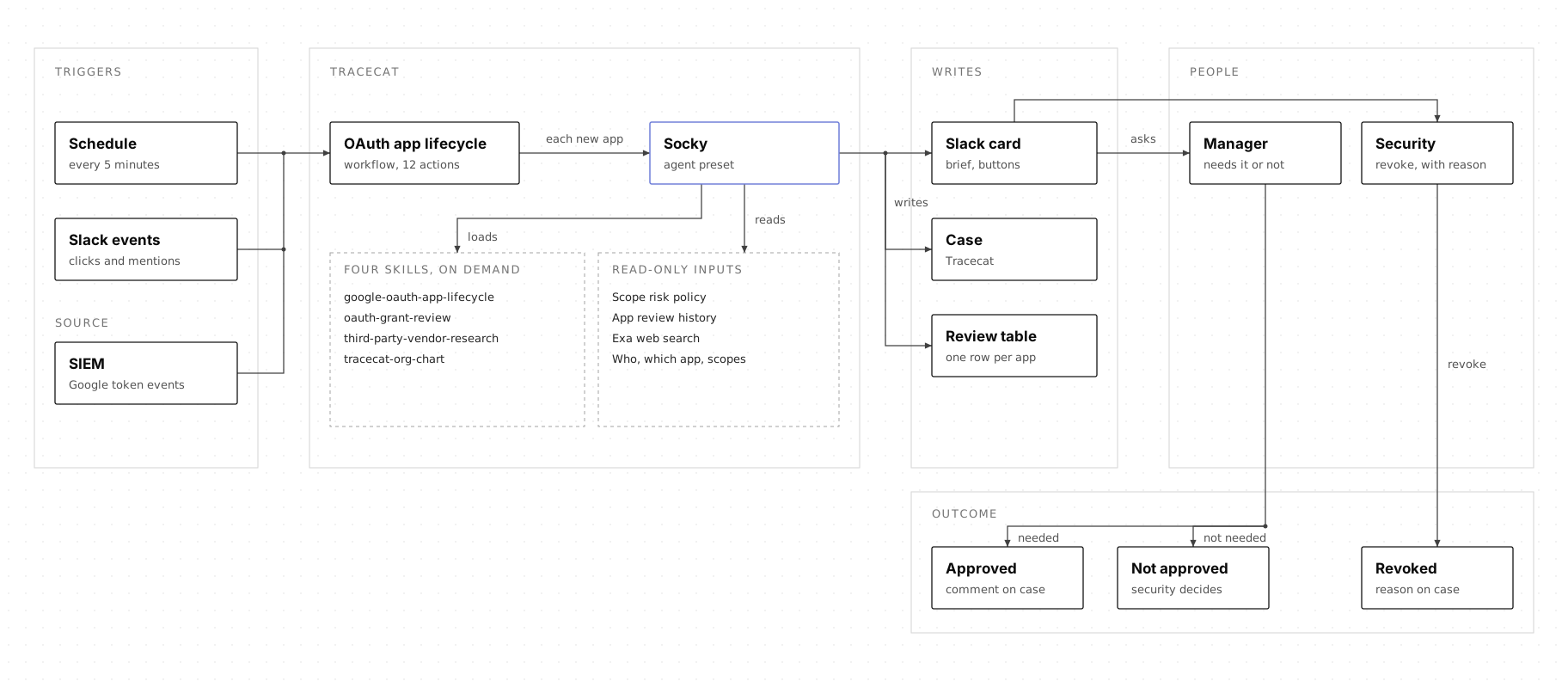
One workflow has three entry points. With no input, it checks the logs. With a Slack button payload, it handles the click. With a Slack mention, it answers a question in a card's thread. When the log check finds new connections, it starts one run of Socky per app, and those runs happen in parallel, so a batch of apps finishes in a few minutes.
Socky itself knows nothing about OAuth. Five skills make it specific, and it loads them only when a run needs them:
google-oauth-app-lifecycle. The path. What to do first, when to stop, the case layout, the Slack card and thread, and the keys later runs read.oauth-grant-review. The judgement. The policy floor, what the agent may add to it, and the fields every assessment must produce.third-party-vendor-research. The six questions about who publishes an app, with a source and a confidence on each.case-writing-style. How a sentence a person reads is written.tracecat-org-chart. Who approves access for whom.
Only the first is specific to this job. The others were already shared with our GuardDuty triage blog.
1. Check the logs for new connections
Every five minutes, the workflow queries Google Workspace token activity in your log store for two kinds of event:
requestevents. Someone reached a blocked app and asked for access. No token exists yet.authorizeevents. Someone completed the consent screen. A live token exists.
The difference matters later, in step 5. The query returns one row per app, with everyone who connected it, and skips service accounts, whose client IDs are numeric rather than ending in .apps.googleusercontent.com.
2. Work out what has changed
This step is where the workflow's memory lives, so it is worth naming what that memory is. Three Tracecat tables carry everything that outlasts a run:
google_oauth_app_reviews. One row per app: the client ID, the scopes, the people who connected it, the assessment, the research, the policy floor, the case, and the card's timestamp.oauth_scope_risk. Your policy. One row per scope, with a risk and a rationale. Read-only to the agent.slack_work_objects. One row per Slack card, so the Slack app can expand a card and map a thread back to its case. Shared with GuardDuty triage.
Tables are not a detail here. They are the difference between a workflow that triages and a workflow that remembers. The inventory table is what turns a one-off assessment into an access review you can hand to an auditor.
oauth_scope_risk is deliberately outside the agent's reach to write, because a policy an agent can edit is not a policy.
Socky reads the google_oauth_app_reviews inventory row for the app's client ID and decides which of four things has happened:
- A new app. It goes through every step below.
- A new person on a known app. The app is reassessed, because the approving manager is different for each person. The case and card are updated, and the thread gets a reply with this person's own Revoke button.
- New scopes on a known app. The app is reassessed against the new scopes.
- Nothing new. Socky stops after about twenty seconds, without writing or posting anything.
That way each app has one case and one Slack card, however many people connect it.
3. Rate the scopes against your policy
How risky a scope is should not depend on how a model reads it on a given run. It is a policy decision, made once by the security team, in a Tracecat table called oauth_scope_risk. Each row has three columns:
- Scope. The permission an app asks for, such as
gmail.modify. - Risk.
low,medium,highorcritical. Fullcalendaraccess, the kind a scheduling tool asks for, ishighin our table. - Rationale. One line on what the scope allows, such as "Read, compose, send and permanently delete mail".
The highest risk among an app's scopes is its policy floor: the lowest severity the case can have, set by your table rather than by the agent. An app that asks for gmail.readonly and openid starts at high, because gmail.readonly is the riskier of the two. The agent can raise the severity, but never lower it.
A scope that is not in the table, an app with no usable name, or a name that matches a known app under a different client ID raises the floor to at least medium.
One rule here came from a real bug. Before Socky calls a scope unclassified, it has to look it up a second time. We added this after a batch lookup returned nothing for three scopes that each had a low row, and a sign-in-only app was rated medium as a result. A missing row changes the verdict, so one empty result is not enough to act on.
4. Find out who publishes the app
An app's name is whatever its developer typed. It is common to see two different client IDs reporting the same well-known product name, which is all a lookalike needs to pass a glance. The client ID and the Google Cloud project number are issued by Google and cannot be chosen, so both go into every search.
Socky runs one Exa search from a fixed template, then answers six questions. Each answer has a source and a confidence of Established, Reported or Unverified.
The first version wrote the research up as a paragraph. The facts were there, but a reviewer had to read the whole thing to find the answer they wanted. The six questions put each answer where it can be found straight away:
- Publisher identity. Does any source tie this exact client ID to the named vendor?
- Vendor. Is there a real operating company behind it, and where is it based?
- Access fit. Does what the app asked for match what it does?
- Data handling. Is access per user or domain-wide, and what is said about retention, sub-processors and certifications?
- Incident history. Has a breach, CVE or advisory been reported, and how did the vendor respond?
- Not established. What was looked for and not found?
Access fit is the only answer that reasons rather than reports, so it is the one a reviewer is most likely to question. A scheduling app asking for calendar read and write access fits. A file-conversion tool asking to send mail does not.
third-party-vendor-research knows nothing about Google, scopes or client IDs. It takes an identifier and a name, and answers the six questions. We also use it when onboarding SaaS tools, and when someone asks in chat whether a vendor is legitimate.
5. Say which event it was
Asking for access and completing the consent screen are two different events in Google's logs. A card that only says a person "connected" an app hides which one happened.
The card has an Event field, second after the app name:
- Access requested. The person asked for approval but has not connected the app. No token exists.
- Connected. A live token exists.
- Requested and connected. Both happened.
It sits near the top because it changes what the reviewer is deciding: whether to allow access that does not exist yet, or whether access that already exists should stay.
It also decides whether Revoke appears. An app that has only been requested has no token, so Revoke would do nothing, and those cards show no button. A scheduling app arrived as Access requested, rated high for its calendar scopes, with no token and no button.
6. Open a case and post the card
Each app gets one case, with severity and priority set to the final risk. The description follows a fixed layout: what happened, what access this gives, why it matters, who holds it, the publisher, the research, the scope policy, what is still unverified and what would close the case.
Socky also posts a Slack Work Object card with the app, the event, the risk, who connected it, whether the publisher is verified, the scopes and the client ID.
7. Ask the manager, and let security revoke
The manager named on the card gets two buttons: They need it and They do not need it. Anyone else who clicks gets a private message explaining why they can't. That check is a workflow expression, not part of the prompt. Only Slack users in the revoke_approvers input can choose a reason.
The manager's answer is a business decision. It changes nothing in Google and does not close the case, and both the case comment and the Slack reply say so.
So revoking takes two clicks. Revoke access posts four fixed reasons in the thread and calls nothing, so the channel can see a revoke being considered. Choosing a reason calls Google, behind a confirmation dialog naming the person, the app and the reason.
- Not needed for work. No business need, or the manager said no.
- Too much access. A legitimate app with more access than it needs.
- Publisher not trusted. Publisher unverified, or the client ID does not match the vendor.
- Suspected compromise. Looks like consent phishing, and tags the case for escalation.
The reasons are yours to set. Ours are the four above. Keeping them fixed is what makes them countable: after a month you can ask how many revokes were for too much access.
8. Answer questions in the thread
A card is a summary, and the person reading it often wants more than it shows. What a scope allows, who publishes the app, or why this person connected it are the questions that come up, and none of them fit a button. Mention the bot in the thread, and it answers there and writes the exchange onto the case, so it is still there when you come back to the app.
How this helps access reviews
An access review of third-party apps tends to come back to the same questions: who has each app, what it can reach, and whether anyone agreed they should have it. Without a record kept along the way, those answers have to be pieced together at review time.
The google_oauth_app_reviews table holds one row per app, with the people who connected it, its scopes, the assessment, the research and a link to the case. The case holds the decisions: whether each manager said the person needs the app, whether access was revoked, and why. When we review access, we start from that table and open the case for anything that needs a closer look.
The same table is where we would start if a client ID were published as an indicator of compromise. One query shows who connected that app, when, and with what access.
Make it your own
This workflow reflects how we work at Tracecat, and if your setup looks similar, you can deploy it as it is. If it does not, the steps still apply, and each one is a separate action you can swap without touching the others. The log query could read from your own SIEM, or call the Google Workspace Reports API directly. The scope ratings could come from a SaaS security tool you already use, the publisher research from a vendor risk platform, and the manager from your identity provider or HR system. Approvals could go through Microsoft Teams or your service desk. If you already have a tool that discovers connected apps, the workflow can start from its alerts and keep the parts it does not cover, such as asking the manager, recording the reason and keeping the case.
What next?
What we learned
- Every new connection gets looked at. The workflow picks up each app within minutes of someone connecting it, rather than at the next review.
- Facts belong in the workflow, judgement in the agent. The first version had thirty actions, with the agent’s output reshaped and validated by a chain of steps that each rewrote the last one’s wording, which is where it drifted.
- The guardrails live in the workflow, not the prompt. Your table sets the floor, the agent can only raise it, and nothing is revoked without a click from someone on your list.
- The record keeps itself up to date. Every answer, revoke and reason is written to the case and the inventory, ready for an access review or a published indicator of compromise.
What we did not cover
- Other providers. Microsoft Entra consent grants, GitHub apps and Slack apps have the same lifecycle with different logs. The pattern carries over: a new query, a new policy table, a new skill and the same agent.
- Blocking an app outright. Google's Policy API lists every API controls setting as not supporting changes, and none of them targets a single app by client ID. The card links to the Admin console instead, where an administrator can block the app under Security > Access and data control > API controls.
The workflow and skills are on GitHub and in the Tracecat docs.
We would love to hear how you are managing OAuth apps today, and who in your company gets asked.