
Scaling security alert automation with agents and ChatOps
Sakil (Founding Security Engineer)
This post is a step-by-step breakdown on how Tracecat uses Tracecat to resolve security alerts in real-time, without slowing the team down.
By the end of technical breakdown, you'll be able to build your own agentic system that autonomously:
- Turns any detection event into a human-readable Slack notification
- Identifies the owner of the affected identity, host, or infrastructure
- Tags the owner and requests verification from them
- Closes or escalates the alert based on the owner's response
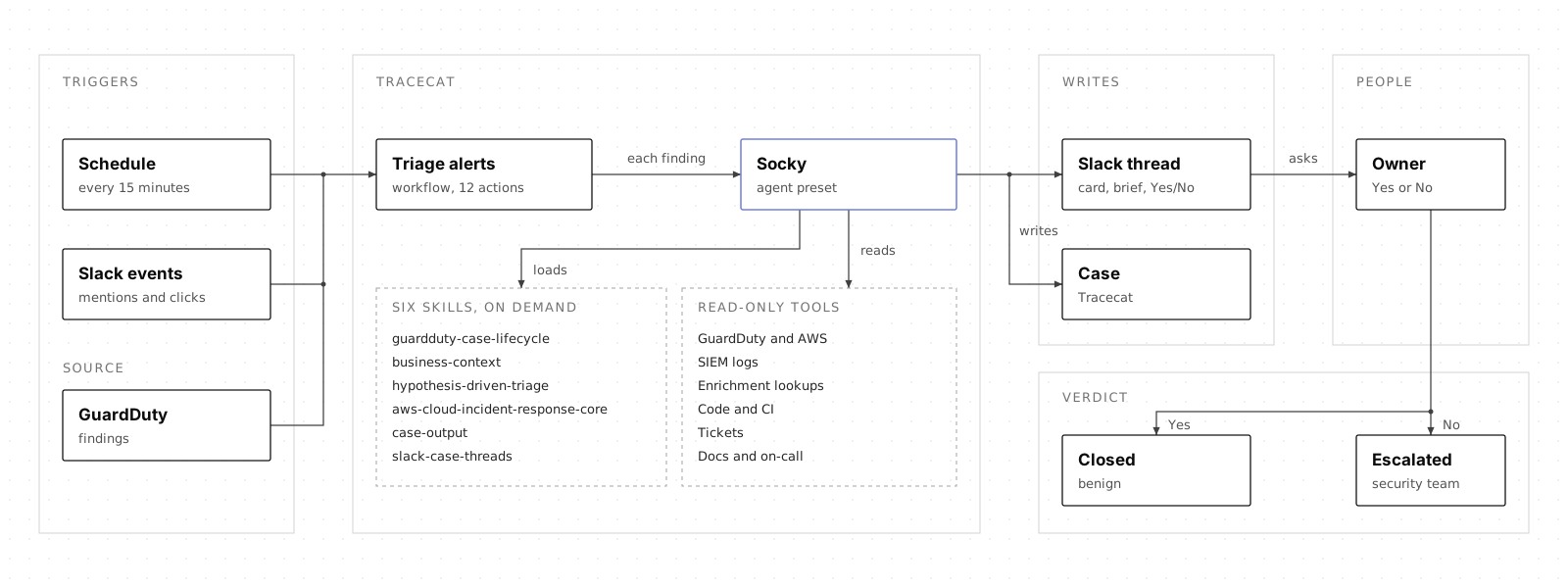
All running on Tracecat with one agent, six skills, and a single 12-action agentic workflow.
Automations-as-code
Everything in this post is open source: https://github.com/TracecatHQ/tracecat
Have these ready before you deploy:
- Tracecat. A workspace with the Tracecat MCP server connected to your coding agent, and an API key for the model provider Socky will use.
- GuardDuty. Enabled in every region you want triaged, and a read-only IAM role that Tracecat can assume to read findings.
- AWS in Tracecat. An AWS integration pointing at that role, so the workflow can list and fetch findings without any long-lived credentials.
- Slack app. Installed in your workspace with permission to post messages and replies, add reactions, and look up people by email so it can tag the owner. Turn on event subscriptions for mentions of the app, and interactivity for the Yes/No buttons, both pointing at the Tracecat webhook URL. Slack needs to be able to reach that URL.
- Slack channel. A channel for triage, with the app invited to it.
- SIEM, if you use one. An integration with read-only access to the logs Socky should search, such as CloudTrail and VPC flow logs. Without one, Socky investigates with GuardDuty and AWS alone.
- Business context. A few lines on what is normal for your organisation, for the
business-contextskill. Optionally, read-only connections to code, tickets and docs (see "Giving Socky the places to look").
Deploy it
Click your coding agent to get a prompt. It connects the agent to Tracecat, then builds in dependency order, checks each step before moving on, and keeps the schedule off and Slack quiet until you have seen a test case.
Click to deploy through prompts
Distributed alerting
One of the fastest ways to reach a verdict about an alert is to ask the person involved whether it was them. Slack popularized this model of alerting in Distributed Security Alerting. Dropbox followed with Securitybot, and Brex described a similar approach when scaling alert management with automation.
That is easy when the alert is about a user: a suspicious sign-in belongs to someone. It gets much harder when the detection relates to some host activity or infrastructure change. An unusual command run by a scheduled ECS job, a suspicious DNS lookup from a production EKS pod, or an overly permissive Terraform apply from GitHub Actions, these events have no clear owner to request a review.
In the following section, we do a technical deep dive into the challenges behind distributed alerting. If you'd like to jump straight into building, feel free to skip to the section Meet Socky the triage agent.
How distributed alerting breaks at scale
Before Tracecat, I was a security engineer and incident responder at a large 2000-person technology company. We had a deterministic SOAR workflow that redirected our SIEM alerts into Slack similar to the one described in the previous section.
This was before AI agents existed. Every detection event that entered the SOAR required someone to:
- Review the alert payload
- Identify the field that identifies a human owner to review the alert
- If field does not exist, identify repeatable drilldown queries that accurately pivot to an owner
As mentioned in the previous section, user-centric alerts are often easy to resolve. Take this Okta detection event for example. It matches user.session.start when securityContext.isProxy is true, and the owner is already in actor.alternateId.
{ "eventType": "user.session.start", "displayMessage": "User login to Okta", "published": "2026-03-14T16:22:08.412Z", "severity": "INFO", "actor": { "id": "00u1ab2cd3ef4gh5ij6k", "type": "User", "alternateId": "jordan.lee@example.com", "displayName": "Jordan Lee" }, "client": { "ipAddress": "198.51.100.23", "geographicalContext": { "city": "Amsterdam", "country": "Netherlands" } }, "outcome": { "result": "SUCCESS" }, "securityContext": { "asOrg": "M247 Europe SRL", "isp": "M247 Ltd", "isProxy": true }}Owner: jordan.lee@example.com, one field lookup away. Send them the Slack message and ask them to confirm the login.
An EKS audit event that matches the Potential Remote Command Execution In Pod Container detection is harder. The caller is the pod service account system:serviceaccount:prod:checkout. No human identity exists in this alert payload.
{ "kind": "Event", "apiVersion": "audit.k8s.io/v1", "level": "Request", "stage": "ResponseStarted", "verb": "create", "requestURI": "/api/v1/namespaces/prod/pods/checkout-7d9f8b6c4-xk2pq/exec?command=ps&command=aux&container=checkout&stderr=true&stdout=true", "user": { "username": "system:serviceaccount:prod:checkout", "groups": [ "system:serviceaccounts", "system:serviceaccounts:prod", "system:authenticated" ] }, "sourceIPs": ["10.0.12.34"], "userAgent": "kubectl/v1.29.0 (linux/amd64)", "objectRef": { "resource": "pods", "namespace": "prod", "name": "checkout-7d9f8b6c4-xk2pq", "apiVersion": "v1", "subresource": "exec" }, "responseStatus": { "code": 101 }}Owner: unknown. system:serviceaccount:prod:checkout is a workload, not a person. Finding a human means digging through pod tags, CI runs, CloudTrail, or an inventory sheet.
At this point, the SOAR engineer would have to collaborate with the detection engineering team to experiment with different drilldown queries to pivot to an owner. Before AI, it can take hours to days to add support for a new detection in the SOAR alerting playbook.
From what I've seen, security teams rarely scaled distributed alerting beyond user-centric detections. Host and infrastructure alerts rarely have a human identity in the payload. The owner lives elsewhere: in tags, in past CI/CD runs, in SSO sign-ins, in inventory spreadsheets (if you happen to have one that's up-to-date), or inferred from searching through audit logs.
The math
Let's consider one detection source as an example: GuardDuty findings. GuardDuty is AWS's native threat detection service that alerts on suspicious activity across your Cloud environment. This is one of the first detection source any Cloud-native company enables to cover the SOC2 control CC7.2: monitor system components for anomalies / security events that could affect objectives.
At the time of writing, there are 204 active GuardDuty finding types covering user (IAM), host (EC2, Lambda, runtime), and infrastructure (EKS, S3, RDS) anomalies.
How long would it take to deterministically map every one of them to an owner, pre-AI? Use a simple formula:
build hours = sum over groups of (finding types x hours to map an owner per type)
The per-type hours assume a competent SOAR engineer who already knows the environment: read the finding schema, write and test the drilldown that resolves an owner, and wire the result into the Slack playbook. User-centric findings carry a principal in the payload, so they take an hour at most. Host and infrastructure findings need pivots into tags, CloudTrail, CI runs, or inventory, so they take up to half a day.
| Finding type group | Centric | Finding types | Hours per type | Total hours |
|---|---|---|---|---|
| IAM | User | 28 | 1 | 28 |
| AI Protection (IAM principal) | User | 3 | 1 | 3 |
| EC2 (VPC flow logs, DNS logs) | Host | 40 | 3 | 120 |
| Lambda | Host | 7 | 3 | 21 |
| Malware Protection for EC2 | Host | 8 | 3 | 24 |
| Runtime Monitoring (instance, EKS, ECS, or container) | Host | 46 | 4 | 184 |
| S3 | Infra | 20 | 3 | 60 |
| Malware Protection for S3 | Infra | 1 | 3 | 3 |
| Malware Protection for Backup | Infra | 4 | 3 | 12 |
| RDS | Infra | 9 | 3 | 27 |
| EKS Protection | Infra | 33 | 4 | 132 |
| Attack sequences (multiple resources) | Mixed | 5 | 4 | 20 |
| Total | 204 | 634 |
User-centric findings are 31 of 204 types and 31 of 634 hours. The other 85% of types and 95% of the effort sit in host and infrastructure findings, which is exactly where most teams stop.
634 hours is 21 engineer-weeks at 30 focused hours a week. That is two engineers for one quarter, or three engineers for seven weeks, to cover one detection source.
And that's just the build out. We still need to account for the maintenance cost. According to the GuardDuty document history, there were 230 updates to the finding types between January 2018 and September 2026, about 6.6 per quarter across 35 quarters. 54 of the 230 entries add, retire, or change a finding type, and some of those add nine or more types at once.
Each change needs someone to read the release note, decide whether the payload or resource type moved, and re-test the affected drilldowns. Call it 30 minutes to triage any change and 1 hour minimum to rework a finding-type change:
176 x 0.5 h + 54 x 1 h = 142 h over 35 quarters ≈ 4 h per quarter
That is the average since 2018. At the current pace of 12 changes per quarter with the same mix, it is about 7 hours per quarter, or one engineer spending half an hour every week on GuardDuty alone, forever.
GuardDuty is one of roughly ten detection sources a mid-size security team runs: Okta, GitHub, CrowdStrike, Google Workspace, and whatever the detection engineers write themselves. Multiply by ten: 6,340 hours to build, which is three engineers for 16 months, followed by about 6 hours a week to maintain. No in-house security team can afford that, so almost all distributed alerting implementations stays stuck on the 15% of alerts that already name a person.
Meet Socky the triage agent
Socky is the agent that owns a finding end to end: it investigates, writes the case, publishes it to Slack, answers questions in the thread and records the owner's answer. Because the same agent that did the investigation also writes the case and answers questions about it, nothing gets lost or reworded when the work moves from one step to the next.
The preset contains which skill to load for which kind of input, it also lists the tools Socky can use (read-only AWS calls, SIEM, Tracecat cases, Slack and the enrichment services). The model is a setting on the preset, so nothing here is tied to one AI provider.
The skills carry the rest. They load on demand, so Socky only has the instructions it needs for the job in front of it:
| Skill | What it gives Socky |
|---|---|
guardduty-case-lifecycle | What to do with a new finding: match it to a case or open one, group related findings, and decide whether to investigate |
business-context | Background on the environment, so findings are judged against what is normal for the organisation rather than in isolation |
hypothesis-driven-triage | The investigative method, so it works through a finding the way an experienced responder would |
aws-cloud-incident-response-core | The AWS-specific checks, the evidence and identity rules, and the structured record every investigation ends in |
case-output | How a case, a Slack card, a brief and a thread reply are written |
slack-case-threads | How to handle anything that comes back from Slack: questions in the thread and the owner's answer |
Where to look for owners (the skills)
Attribution is the hardest part of triage, and it is hardest for alerts that have no person in them. Take the EKS exec event from earlier in this post. Here is one way to work it by hand, and then how we turn that work into skills that Socky uses for every other non-user alert too.
Working one by hand
The caller is the service account system:serviceaccount:prod:checkout, so there is nobody to ask yet. One way to start is to work outwards from the workload to the people around it:
- Name the workload. The pod
checkout-7d9f8b6c4-xk2pqbelongs to thecheckoutdeployment in theprodnamespace. - Find its owner. Check the labels and annotations on the deployment and namespace, then the service catalogue. If they are empty, look at the repo that deploys it: who is in
CODEOWNERS, and who merged the last change. - Look for planned work. A change ticket, a deploy in CI around the same time, or an open incident where someone is legitimately debugging production.
- Find the person. The source address
10.0.12.34is internal, so match it to a VPN or bastion session, and that session to an SSO sign-in. - Compare with normal. Has anyone exec'd into this service before? Does a runbook say this is how it gets debugged?
If a ticket explains it and the steps land on one person, the finding is benign and a quick confirmation closes it. If nothing lines up, that is also an answer: unexplained activity on a production workload with no change behind it.
Every one of those steps means finding information that lives somewhere else in the company: the cluster, the code, the ticket queue, the sign-in logs. For an alert with no person in the payload, that adds up to a lot of research before anyone can ask the right question.
From one alert to a skill
This is the work we hand to Socky through skills. Strip out the Kubernetes details and the same questions come up for an S3 policy change, an unusual DNS lookup from a host, or a Terraform apply from GitHub Actions. Only the places to look change.
| Question | Where the answer lives | In the EKS example |
|---|---|---|
| What is this identity or resource? | Cluster, cloud IAM, inventory | Service account checkout in prod, which is the checkout deployment |
| Who owns it? | Service catalogue, CMDB, team labels, code owners | Team label on the deployment, CODEOWNERS in the deploying repo |
| Was it planned? | Tickets, CI/CD runs, incidents | A change ticket, a deploy, or an on-call incident |
| Which person acted? | SSO, VPN, bastion logs | The session that held 10.0.12.34 at the time |
| What is normal here? | Past cases, docs, runbooks | Earlier exec sessions into checkout |
We write that method down once in skills, instead of writing a drilldown for each of the 204 finding types. hypothesis-driven-triage sets out the order of work: form the possible explanations, then look for the evidence that separates them. aws-cloud-incident-response-core holds the AWS-specific checks and the identity rules. business-context holds what is normal for your organisation. A new finding type reuses the same method instead of costing another few hours of build time.
Giving Socky the places to look
Most GuardDuty findings are not attacks. They are unusual activity that turns out to be someone doing their job. The difference between unusual and unexpected is context: was this change planned, who owns this service, is this how this system normally behaves? Not all of that belongs in a skill. Socky can also read the places where it already lives, through read-only tools connected to Tracecat. Every organisation uses different tools, but these types add the most context:
- Code and CI. Who owns a service, what the infrastructure code says should exist, and what was deployed around the time of the finding e.g. Github, Gitlab or Sourcegraph.
- Tickets. Whether a change ticket covers the activity, so planned work is recognised as planned e.g. Jira, Service Now or Linear.
- Docs and knowledge search. What runbooks and team pages say about a system, and who to ask about it. For example Glean or Confluence.
- On-call and service catalogue. Who is on call and who owns what e.g. PagerDuty or Incident io
With that context, a finding a ticket explains can be closed as Benign, owners get pinged less often, and activity that matches no planned change or documented behaviour is a stronger reason to escalate. Access stays read-only and scoped to what the investigation needs, and anything the agent reads from these sources is treated as data rather than instructions.
Keeping context fresh
Context eventually goes stale for various reason e.g. teams reorganise, services change owners and what counts as normal drifts. We keep this manageable by giving environment facts their own skill. business-context holds facts only: what the company is, how its AWS estate is laid out, what normal activity looks like, which identities and patterns are expected, and which telemetry exists. The rules for reaching a verdict live in hypothesis-driven-triage, so updating what Socky knows about your environment never changes how it decides.
Facts that change often, such as owners, tickets and recent deployments, do not need to be copied into that skill at all. A skill can declare its own tools in its SKILL.md frontmatter under metadata.tools, including MCP integrations connected to Tracecat, so Socky can read them from tools like GitHub or Jira at investigation time. They are as fresh as the source, and the skill keeps only the slower-moving facts, such as what normal looks like for a given service.
When those slower-moving facts need to change, such as a new service or a retired account pattern, the team makes the change the same way as any other fix. Ask your coding agent, connected to Tracecat MCP, to edit the skill's draft, review the change, then publish it. Publishing creates a new immutable version, and the preset uses it on its next run without any change to the preset itself.
From finding to verdict
Follow one anonymised GuardDuty finding through the six steps of triage, from the scheduled poll to the owner's answer. Steps 3 to 6 show what Socky produces at each point. Answer as the owner in step 5 to see how the thread plays out in step 6.
Every 15 minutes the workflow asks GuardDuty in every enabled region for findings updated in the last 20 minutes. The window is longer than the schedule so that a finding at the edge of one run is caught by the next.
Each finding goes to Socky on its own. To test or re-triage, run the workflow by hand with a single finding ID.
The case Socky writes
For each finding, the workflow hands off to Socky, which investigates and writes a Tracecat case. The case holds the verdict, what was flagged, whether it is expected, the evidence behind it, and anything Socky could not check.
The alert lands in Slack
Socky posts a card to the triage channel with the finding, the verdict so far and the evidence behind it. The full brief sits in the thread, with the next steps for the owner and a Yes/No prompt.
The owner asks questions
The owner does not have to answer cold. They can reply in the thread and ask Socky for more context, and it answers from the evidence it already collected instead of starting again.
The owner gives the verdict
One click on Yes or No records the owner's answer. Socky updates the case, closes it if the owner confirms the activity, and posts the outcome back in the thread.
The case updates
The click does not only change the thread. The same answer is written back to the case, so whoever opens it later sees the owner's confirmation alongside the original evidence.
Staying in control
Socky can only do what its preset allows, and you can see what it did. The limits are set on the preset, not left to the prompt.
| Control | What it does | Socky |
|---|---|---|
| Allowed tools | An allowlist of Tracecat actions. Skills can declare tools too, so review the preset's tools plus those of its skills | VirusTotal, AbuseIPDB and urlscan lookups, plus case search, list and get |
| MCP integrations | Which MCP servers the agent can call. A namespace restriction does not filter MCP tools, so attach only the ones you want | SIEM and GitHub |
| Internet access | Lets the agent reach the web from its sandbox when a tool needs it | Off |
| Approval rules | Requires a person to approve a tool call before it runs. Enterprise Edition | Required for URL lookups |
| AWS access | The role the agent's AWS calls run as | A read-only role that reads our account but cannot make any change |
- See what it did. Agent runs can export OpenTelemetry metrics, logs and traces to your own collector, including token usage, cost and tool calls (setup guide). Telemetry is off until an organization admin turns it on, and prompt and tool content is opt-in, so you decide what leaves your deployment. Each case also carries its own record: the verdict, the evidence behind it, and anything Socky could not check.
- When something fails. If a workflow action fails, the run shows it. If a tool call inside Socky's investigation fails, Socky notes it in the case as something it could not check, so the gap is visible to whoever reads the case.
- When Socky is wrong. The team owns the improvement loop. Someone works out why and fixes it in the skill or the preset, using the same edit, review and publish steps described under "Keeping context fresh" above.
What next?
What we learned today
- Attribution is a method, not a drilldown per finding type. Writing the questions down once in skills lets one agent handle user, host and infrastructure findings alike.
- Context turns "unusual" into "expected". Read-only access to the places where code, tickets and docs already live is what makes that call possible.
- A person makes the call. Socky investigates, attributes and writes it up, and the owner's answer sets the disposition.
- The pattern carries over. Nothing about Socky is specific to GuardDuty except its skills. The next alert source, whether that is endpoint, identity or SaaS, is a new skill for the same agent rather than a new set of workflows.
What we did not cover
- Containment. What happens after a case is escalated.
If you want to try this against your own GuardDuty findings, the workflow, preset and skills are on GitHub and in the Tracecat docs.
We would love to hear how you are triaging today, and where you draw the line between agent and human.
Coming next
- Metrics. How to tell whether triage is getting faster and better, and the SOAR metrics we track to answer that.
- Deduplication. How repeat and related findings end up in one case.
- How to model entities. How to represent users, hosts and services so alerts about the same thing line up.
Stay tuned.