
Open-source agentic detection engineering with ChatOps
Sakil (Lead Security Architect)
Somebody else's breach gave us one question we could not stop thinking about: if someone used leaked keys against our cloud accounts, would we notice?
On October 21, 2026, Railway disclosed that customer secrets stored on its platform may have been exposed. For many teams, those secrets include the keys to their cloud accounts. We wrote new detections for it that same day, and eleven were live before the day was out.
Then a later question turned up something we did not expect. A rule we were relying on had a name that promised protection, and logic that could never match a single event.
That is the uncomfortable part of this work. Having an alarm is not the same as knowing it works. We wanted to know ours worked, not just that they existed.
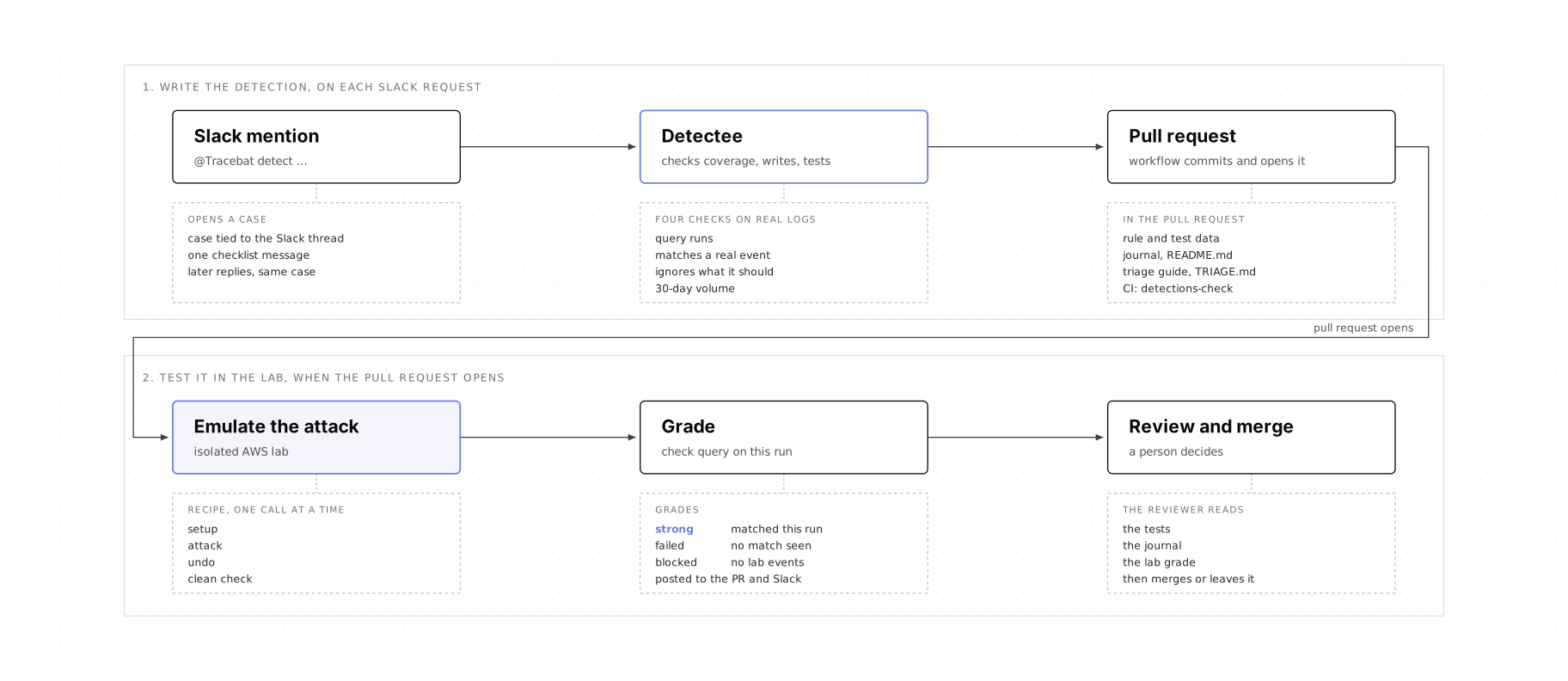
So we built a way to find out, and we run it from Slack. Tracebat, our Slack bot, takes the request. Detectee, our detection agent, researches and writes the detection. Three workflows open the pull request, run the attack in an isolated AWS account, and post the result back in the thread. A person reviews the pull request and decides whether to merge it.
The detection that closed that gap went from a question in Slack to a pull request in ten minutes, and fifteen minutes later the lab confirmed it caught the attack's events. Here is how.
How it works
This section follows one request through seven steps: the question that led to the twelfth Railway detection. Each step says what happens on every request, then what happened on this one.
1. Ask in Slack
Anybody in one of the allowed Slack channels can start a request by mentioning Tracebat. There are two ways to ask:
- Directly:
@Tracebat detect <link or text> - As a question:
@Tracebat can you create Google Workspace detections for unexpected Drive activity?
A question only counts as a request when it asks for a detection with a word like create, write, build or propose. "Why did this detection fire?" goes to Socky, our triage agent, instead. For a real request, Tracebat opens a case and links it to the Slack thread, so every later message in that thread lands in the same case.
In the Railway request, we asked Tracebat whether we would catch a leaked AWS key being used to create a console password for an IAM user.
2. Research the attack and check coverage
With the case open, Detectee turns to the request itself. Some requests are a plain question with nothing attached. When a request includes a write-up or a link, Detectee reads it first and sorts what it says into three groups: what it says happened, what is likely but not stated, and what nobody knows yet.
Railway's disclosure said environment variables may have been read and some may have been decrypted. It did not say which credentials were used afterward, or how. So reconnaissance, new IAM users or keys, instance launches and calls from unusual regions are treated as things worth detecting, not as things the Railway attacker did. Detectee tags each detection with the MITRE ATT&CK technique for the behavior it looks for. It also notes whether the write-up reported that behavior, or whether it is our idea of what an attacker could do next.
Then it checks whether we already detect it. Detectee reads the query of every detection we run, ours and our SIEM's managed ones, and compares what each one matches rather than what it is called. Two rules with different names can match the same events, and a rule whose name sounds right can still miss the attack. What happens next depends on what it finds:
- Already covered:
Detecteenames the rule and stops. That means the rule exists and looks for the right events, not that it works. For AWS detections, step 7 tests that. - Nearly covered by one of our rules: it proposes tuning that rule instead of writing another.
- Covered only by a managed rule: it cannot change that rule, so it writes a narrower one only when that adds precision, and says why both stay.
In the Railway request, the behavior was a console password being created for an IAM user:
- Detection:
aws-iam-login-profile-added-to-existing-user - Platform: AWS CloudTrail
- MITRE ATT&CK:
T1098.001Account Manipulation: Additional Cloud Credentials - Detection type: Sigma
Everything below is our assumption about what an attacker could do with a leaked key, not a claim about what happened at Railway.
That behavior can turn API access into console access. It needs three things: the key must have permission to call CreateLoginProfile, the target user must not already have a password, and any MFA requirement still applies at sign-in. If those hold, the attacker has a way back in that does not depend on the leaked key.
Before writing anything, Detectee checked our own and the managed detections. Three of them touch the same API call, and none of them catches it on its own.
The closest was the managed aws-iam-user-created-with-console-access, and its name suggests exactly this coverage. This is the rule:
Its condition needs creation and console_access to match the same event. One needs eventName: CreateUser and the other needs eventName: CreateLoginProfile, and a single CloudTrail record only ever has one event name. So the rule cannot match any event, including a password added to an existing user.
Our own aws-iam-backdoor-user-chain also reads CreateLoginProfile, but only as part of a chain that starts with a new user and ends with a permission change. aws-iam-user-key-write-activity catches writes from long-lived keys, but not from temporary credentials or assumed roles. A console password created on its own was the gap.
The name made it look like we were covered. Reading the query showed we were not. So Detectee proposed a new, narrow rule for the one behavior the others miss, rather than another rule with a different name and the same logic.
3. Write and test against real logs
When the coverage check finds a gap, Detectee writes a detection to fill it. Before it writes the query, it reads the SIEM table's columns and a few sample events, so the query only uses fields that exist in our logs rather than fields the agent expects to exist.
Every candidate gets four checks:
- Does the query run? The fields exist and the query finishes in time.
- Does it catch the attack? It matches a real event it should catch.
- Does it ignore what it should? It does not match a similar event the rule is meant to exclude. What that event is depends on the rule.
- How noisy is it? How often the detection would have fired in the last 30 days.
One check passing is not enough. A query that runs can still miss the attack. A query that catches the attack can still be too noisy. Zero matches in thirty days does not show that it works. Missing evidence is reported as missing, and a failed check or a missing log source blocks the proposal rather than being counted as a pass.
Detectee writes Sigma for single events and scheduled SQL when the logic needs aggregation, time windows, first-seen behavior or joins. A single API call that should never happen is Sigma. A burst of access-denied errors across several services is SQL. The detection logic decides, not the agent's preference.
In the Railway request, the new rule looks for a successful CreateLoginProfile call from IAM, by any caller:
detection:
  selection:
    eventSource: iam.amazonaws.com
    eventName: CreateLoginProfile
    readOnly: false
  filter_failed:
    errorCode|re: '.+'
  condition: selection and not filter_failed
It checks the event source, the event name and that the call was a write, and it leaves out failed calls. It has no actor exclusions. No stable benign pattern showed up in the evidence, so Detectee did not invent one. Exclusions should come from real triage outcomes later, not from a guess at authoring time.
The rule describes a behavior, not intent. It is meant to match every successful console password creation, including legitimate ones, until somebody tunes it. Password changes use other API calls, such as UpdateLoginProfile, so the rule does not see them. Despite its name, it does not check how old the user is, so it matches password creation for a user created a minute earlier.
Detectee tested the rule against our SIEM before the pull request opened.
query_execution: pass
positive_case: 1 successful CreateLoginProfile matched (246 ms)
failed_call_exclusion: 1 failed CreateLoginProfile, no match (243 ms)
matches_30_days: 7, all from the lab account
query_runtime: 1,219 ms over 30 days
known_limits: event does not show who created the user or if a leaked key was used
Both tests used real events: a successful CreateLoginProfile from an earlier lab run, now stored in testdata.ndjson, and a failed one the rule ignores by design. A failed call can still be a sign of suspicious activity, but this rule only covers successful ones. All seven matches in thirty days came from the lab, with none in production. That shows the rule matches the right event, not that it catches the attack.
4. Package the detection as code
A detection that passes those checks is still only a query. For somebody to review it, it has to arrive as code, with its reasoning next to it. Every proposal follows the repository's layout and carries three things:
- The rule. For Sigma,
rule.ymlandtestdata.ndjson. For scheduled SQL,detection.yamlandquery.sql. The detection includes severity, risk score and ATT&CK identifiers. - The journal. A
README.mdthat says why the detection exists, what it catches, how it works, what it was tested against, the expected false positives, its limits, related rules, references and the change history. - The triage guide. A
TRIAGE.mdthat says what fired, what to look at, when the activity might be benign and when to escalate. The same guidance goes into the rule's notes, so whoever gets the alert sees it too.
When somebody later asks why a detection exists or why a filter was added, the answer is in the journal next to the rule.
5. Open the pull request
Detectee hands the files back. It cannot commit them, so the workflow makes three fixed calls:
- Check the paths. Every file must stay under
detections/<source>/<name>/, so a path that climbs out with..stops the commit. - Commit. One signed commit on a
tracebat/<case>-<slug>branch. - Open the pull request. With the test evidence, the existing coverage, the lab plan and a link to the case.
CI then runs a check called detections-check. It confirms the rule file is valid, the journal and triage guide are there, the ATT&CK IDs are real, and any overlap with an existing rule is listed in both rules' journals. It also runs changed SQL against recent data and dry-runs the SIEM changes. The pull request opens as a draft when it changes an existing detection. For an AWS detection, the lab grade arrives later as a comment. It is not a required check yet, so the reviewer decides whether to wait for it.
In the Railway request, the workflow stored the new emulation recipe, the attack steps for the lab, in the emulation_recipes table, committed the other files and opened the pull request, and CI passed. The new rule overlaps with aws-iam-backdoor-user-chain, so Detectee also added the new rule to that rule's journal. Changing an existing file made the pull request a draft.
The detection was in review, with its query, tests, limits and triage guide in one folder. Whether it would catch the behavior was still open.
6. Report back in the original thread
The workflow saves the case, ticks the pull request off the checklist and replies in the thread: the detection name, the pull request, what the rule catches, how it was tested and what remains before it can be enabled, with cards for the pull request and the case.
The case and the pull request carry the same evidence, so nobody has to rebuild the investigation from Slack history. When the pull request merges, closes or deploys, a status step updates the case and replies in the thread again.
7. Test AWS detections against emulated attack behavior
So far the detection has only been tested against old events. That shows the query matches the right kind of event, not that it catches a fresh attack through our logging path. A wrong field or a short time window could still slip through. Emulating the attack produces new events, sends them through our logging path, and shows whether the rule picks them up.
This step applies to AWS detections. The lab is an AWS account, so it can only run AWS attacks.
There are three levels of evidence that show a detection works, each stronger than the last:
- The query matched. A SQL check query written for the detection matches an event from an emulation run.
- The deployed rule fired. The rule, running in the SIEM, created a detection for those events.
- The alert arrived. That detection reached the person or system that acts on it.
The validation workflow reaches the first level today. It runs the attack steps in the AWS lab and gives the detection one of three grades.
| Grade | What it shows | What it doesn't show |
|---|---|---|
| Strong | The check query matched at least one event from this run | That the deployed rule fires, that an alert is sent, or that it catches every variation |
| Failed | Lab events arrived in the last 24 hours, but no matching event from this run was seen. The cause is not confirmed | That the detection missed. The attack event may not have arrived yet |
| Blocked | No lab events arrived in the last 24 hours, so a zero result proves nothing | Anything about the detection |
A strong grade means the SQL check query matched an event from this lab run. The reviewer also checks that the query represents the proposed rule. It is stronger evidence than a passing CI check or an old match, and it is still the first level.
The lab
Emulation needs somewhere safe to run attacks. Ours runs in a separate AWS account, in its own organizational unit, with its own guardrails and audit logging. Controls protect its audit trail and its membership of the organization, and a budget alarm watches its spend. Its CloudTrail logs feed the same SIEM as production, so the validation workflow tests the detection against events that go through our real logging and query path, without running attacks in production.
Queries against the lab filter on the lab account ID. Production detections do not exclude the lab, so an emulation can raise a real alert from a rule that is already deployed. We accept that, because an alert from a known emulation run is easy to recognize. An alert like that comes from a rule we already run. It tells us nothing about the new detection, which is still waiting in the pull request and is not deployed yet.
Recipes are data, checked before execution
What runs in the lab is a recipe: an ordered list of AWS API calls in three phases:
- Setup: Create what the attack needs, such as an IAM user.
- Attack: Do the one thing the detection should catch.
- Undo: Delete everything the setup and attack created, such as the console password and then the IAM user. A final read call, the clean check, then lists the lab's resources to confirm none of them are left.
Keeping setup and attack apart matters. If the setup produced the same suspicious activity as the attack, a detection could match the setup and be graded strong for the wrong reason.
Detectee writes the recipe as structured data, and the workflow stores it in a Tracecat table, not in the pull request. Detectee never runs it and holds no cloud credentials. We built the recipe format and the runner ourselves. Open-source projects such as Stratus Red Team shaped how we approached adversary emulation.
The detection workflow stores each recipe unapproved, and the validation workflow checks it before anything runs. A recipe runs if it passes these checks, or if a person has marked it approved. An approved recipe skips the checks.
- Every write is one of eleven allowlisted AWS calls, such as creating a user, an access key, a key pair or a security group. Read calls (
get_,list_,describe_and similar) are allowed on any service. - Every write has its undo call in the undo step.
- The text
tracecat-emulationappears in the parameters of every write. - There is exactly one clean check, and it only reads, for example listing the IAM users the recipe could have created. The recipe has no more than six setup and attack steps.
An unapproved recipe that fails these checks does not run. Detectee writes both the detection and its recipe, and the workflow records which recipe belongs to which detection. The account and region come from the workflow's own settings, not from the recipe, and an account guard stops every call if the role is not in the lab account.
The checks limit which calls a recipe can make, not every argument. The checks make sure each call is one we allow, but they do not check every value passed to it. Detectee writes the recipe, and it reads web pages that could contain hidden instructions. A page like that could push Detectee to change those values. The separate account and the limited role reduce what a change like that could affect, but they are not a guarantee. What the workflow enforces is the list above: only allowed calls, an undo for every write, and a check that the role belongs to the lab account before every call. Recipes also use fixed resource names, so two runs of the same recipe at once could collide.
Every recipe carries its own undo steps and a clean check. The recipe check refuses an unapproved recipe that creates anything without a matching delete. On a successful run, the undo steps send the matching delete calls one at a time, in the order the recipe lists them, such as deleting the console password before the user. The clean check then lists the lab's resources and confirms that nothing the run created is still there. The result is posted in the Slack thread.
If an AWS call fails part way through, the run stops and the failure card in Slack says which call AWS rejected. An hourly sweep then reads CloudTrail for tracecat-emulation resources that were created and never deleted, turns each one into the right delete call, and runs them in order through the same step runner. It reports what it removed in Slack, and the failure card reports it if the sweep itself fails.
Every execution has an identity
The lab does not run the detection itself. It runs a SQL check query against the events from one run. For a Sigma detection, Detectee writes a SQL version of the same logic. For a scheduled SQL detection, it starts from the detection's own query. Either way, the check query is a copy, so the reviewer checks that it matches the rule.
To find this run's events, the workflow uses an AWS role whose session name carries the execution ID. Every call it makes is stamped with that ID, and the check query only looks at events that carry it:
position(rawLog, {run_id:String}) > 0
Without that filter, an unrelated event from last week or from another test could count as a match. The ID says which run an event came from, but not which step, so the check query looks only for the attack's API call.
Run, clean up, then evaluate
Before any call, the workflow checks that its AWS role belongs to the lab account, then makes the recipe's calls one at a time: the setup, the attack, the undo steps and the clean check. CloudTrail does not deliver events straight away. AWS says it typically takes about five minutes, and its user guide says that is not guaranteed, so with SIEM ingestion on top the workflow waits fifteen minutes, the longest our lab has taken.
The check query then asks whether anything from this run matched and whether any lab events arrived in the last 24 hours, and the answers give the grade from the table above. The workflow saves the grade with the commit it tested and posts it on the pull request, the case and the Slack thread. A new commit starts a new run and an already-tested commit is skipped, but changing the stored recipe does not start one, and the grade does not record which version of the recipe ran.
The Railway result
emulation_status: matched, graded strong
recipe: detectee.CASE-0335-iam-login-profile-existing-user  # new, written by Detectee, passed the fixed check
execution: validation run on October 21, started when GitHub reported the pull request
expected_behavior: CreateLoginProfile for tracecat-emulation-existing-login-profile-user
observed_result:
  - check query matched one CreateLoginProfile event from this run
  - 3,209 lab events arrived in the previous 24 hours
  - clean check found no emulation user afterward
grade: strong
The lab created a test user, gave it a console password, then deleted both and confirmed the user was gone. Fifteen minutes later, the check query searched this run's events for CreateLoginProfile and found exactly one, ignoring the setup's CreateUser, and the grade landed in the Slack thread twenty-five minutes after the original message. That shows the check query matched the attack's event in one traced run. It does not show that the deployed rule fired or that an alert reached anyone, because the rule is not deployed yet.
Why the agents never hold cloud credentials
Detectee reads breach disclosures, write-ups and other web pages, and none of that is trusted. A page can carry instructions meant for an agent, and if that agent held AWS credentials, the page could tell it to make changes in our AWS account. So Detectee only has web access and read-only SIEM tools, and its detection files and recipes are proposals: the workflow commits the files, a fixed check or a person decides whether a recipe may run, and only the validation workflow holds the lab role. That takes direct cloud access away from the agent that reads untrusted material. It does not make prompt injection impossible, because Detectee still writes the recipe, so a manipulated agent could still shape what runs in the lab, within the checks above.
Tuning what already runs
The same path also changes detections we already run, usually because they are too noisy. Tuning goes through the same detection workflow. Somebody asks in Slack, for example @Tracebat tune the tor-exit-nodes detection. To help people choose, a small workflow posts every Monday the detections that fired 35 times or more in the last week.
Detectee uses Socky's cases as evidence. If many alerts were closed as harmless for the same reason, that reason is a candidate pattern to investigate, not an exclusion to add straight away.
A tuning proposal carries four things:
- Evidence: The alerts, the cases and how they were closed, and the pattern they share.
- Change: The new filter, threshold or time window.
- Backtest: The old and new rule run over the same past events, to show that alerts from escalated cases and known malicious activity are still caught.
- Cost: What the changed rule could now miss.
The change arrives as a pull request against the existing rule. If the backtest shows that it would hide an alert from an escalated case, Detectee stops and opens no pull request, and the case says why.
What next?
What we are building next
- A wider lab. Only AWS is emulated today. Detections for other platforms are tested against real logs, but no lab runs their attack steps yet. The recipe model extends to any platform that has an API and an audit log.
- Scheduled re-tests. The validation workflow can already re-test one detection on request, with its stored recipe. We are putting that on a schedule, so every detection with a recipe runs in the lab again on a regular basis. If a log format, a configuration or the data pipeline changes and a detection stops matching, a scheduled run can show the drop in its grade earlier than we would otherwise notice.
What we did not cover
This automation writes, tests and proposes detections. It takes no action against an attacker.
- Nothing in production is changed. When a detection fires, the automation does not disable keys, revoke sessions or remove users. The only AWS resources it creates and deletes are the lab's own.
- Deployment follows the repository's existing release process. A merged detection goes out the same way as any other change to the repository.
Further reading
For an independent take on the same problem, read Tejas Paranjape's Detection Factory, a pipeline where automated gates and backtesting decide whether a rule ships.
We would like to hear how long your team takes to go from a breach disclosure to a tested detection, and when you last ran the attack a rule was written for.